
Looking for a Screen Studio alternative for Windows?
Screen Studio is known for creating beautiful screen recordings with automatic zoom, smooth cursor animations, webcam overlays, and polished backgrounds. But there's one major limitation: Screen Studio is only available for macOS.
Windows users need an alternative that offers the same kind of polished recording experience without requiring expensive software.
That's where Recordful comes in.
Recordful is a free, open-source screen recorder for Windows that turns ordinary screen recordings into professional-looking product demos, tutorials, and walkthroughs.
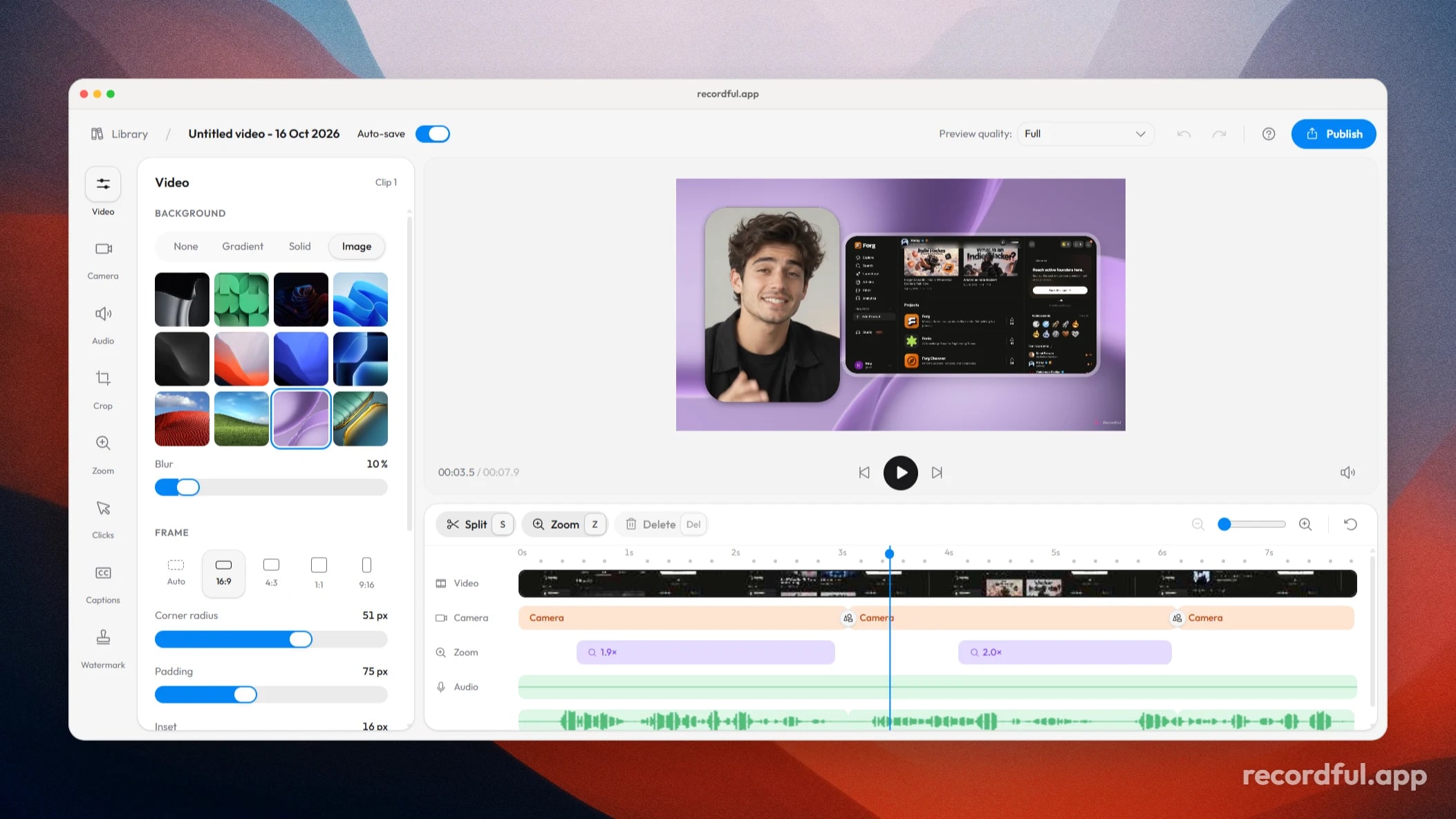
It includes automatic zoom, advanced zoom controls, smooth cursor effects, webcam overlays, customizable backgrounds, and a built-in video editor.
Why choose Recordful as your Screen Studio alternative?
Traditional screen recorders capture your screen. Recordful helps you create a finished video.
Instead of manually adding zoom animations, adjusting every cursor movement, and spending hours polishing your footage, you can use Recordful's built-in features to make the process easier.
Here's what makes it different.
1. Automatic zoom that follows your interactions
This is one of the biggest reasons creators love Screen Studio.
Recordful brings automatic zoom to Windows, helping viewers focus on the important parts of your screen.
Automatically zoom into clicks and screen interactions.
Customize zoom levels and animation behavior.
Adjust zoom transitions using advanced controls.
Add smooth cursor movement and click effects.
It's particularly useful for software tutorials, coding walkthroughs, and SaaS product demos.
2. A built-in editor with multi-clip support
Recordful doesn't stop when you finish recording.
Its built-in editor lets you continue working on your video and bring additional media into the same project.
You can:
Add another existing Recordful recording.
Import local video and other supported media.
Combine multiple recordings into one editing project.
Continue editing without starting over.
Customize zoom and visual effects.
This is useful when you're creating longer tutorials or combining different sections of a product demo.
3. Make your recordings look professional
A plain screen recording isn't always the best way to present your product.
Recordful lets you customize the appearance of your videos with:
Background images and gradients.
Custom spacing and frames.
Shadows and depth effects.
Webcam overlays.
Adjustable camera positioning and sizing.
You can turn a simple desktop recording into a polished presentation without needing a separate design tool.
4. Webcam overlays for tutorials and demos
If you create tutorials, walkthroughs, or product demonstrations, showing your face can make your videos more engaging.
Recordful lets you include a webcam overlay and customize its appearance.
Position and resize your camera bubble to fit the layout of your recording.
5. Free and open source
You don't need to pay for a subscription just to record and export videos locally.
Recordful is free and open source.
No watermark on local exports.
No account required to start recording.
No imposed recording time limit in its free local workflow.
Works offline.
Source code is publicly available.
You can use its core desktop recording and editing features without depending on a paid cloud service.
Recordful vs Screen Studio for Windows
Screen Studio is built exclusively for macOS. Windows users cannot install its native application.
Recordful offers Windows users an alternative with:
Automatic zoom and advanced zoom controls.
Smooth cursor animations.
Webcam overlays.
Custom backgrounds and video frames.
Multi-clip editing.
Local media imports.
Built-in video editing.
Free, open-source desktop software.
If you're a developer, designer, educator, or content creator using Windows, Recordful gives you a way to create polished screen recordings without switching to macOS.
Recordful vs other Windows screen recorders
Many Windows screen recorders focus primarily on capturing your display.
Recordful focuses on the complete recording experience, including what happens after you stop recording.
Instead of needing separate applications for capture, zoom animations, cursor effects, backgrounds, and basic editing, you get these capabilities in one workflow.
Its open-source nature also means you're not restricted to a proprietary recording application or forced to pay for basic local exports.
Frequently Asked Questions
What is the best free Screen Studio alternative for Windows?
Recordful is a strong free and open-source alternative to Screen Studio for Windows. It offers automatic zoom, smooth cursor animations, advanced zoom controls, webcam overlays, customizable backgrounds, and multi-clip editing.
Is Screen Studio available for Windows?
No. Screen Studio is designed for macOS and does not offer a native Windows application. Recordful is an alternative for Windows users who want polished screen recordings.
Is Recordful free on Windows?
Yes. Recordful's desktop application is free and open source. Its core local recording and editing workflow does not require a subscription or account.
Does Recordful add a watermark?
No. Recordful's local exports do not add a watermark.
Can Recordful automatically zoom into clicks?
Yes. Recordful supports automatic zoom and advanced zoom controls, so you can customize how zoom animations behave throughout your recording.
Can I combine multiple recordings in Recordful?
Yes. You can add existing Recordful recordings or local media files to an existing project and edit them together.
Can I use Recordful without an internet connection?
Yes. The desktop application supports local recording and editing workflows without requiring an internet connection.
Download Recordful for Windows
If you've been looking for a Screen Studio alternative that works on Windows, give Recordful a try.
Get automatic zoom, smooth cursor animations, webcam overlays, multi-clip editing, and a polished recording workflow in one free, open-source application.