

If you’re a Mac user, there are some genuinely useful apps that can make your everyday workflow faster, easier, and a lot more enjoyable.
Whether you’re a developer, designer, student, or someone who simply loves discovering useful software, these six apps are worth checking out.
From creating beautiful screen recordings to managing your clipboard and organizing windows, each app solves a different problem.
Let’s get into it.
1. Recordful

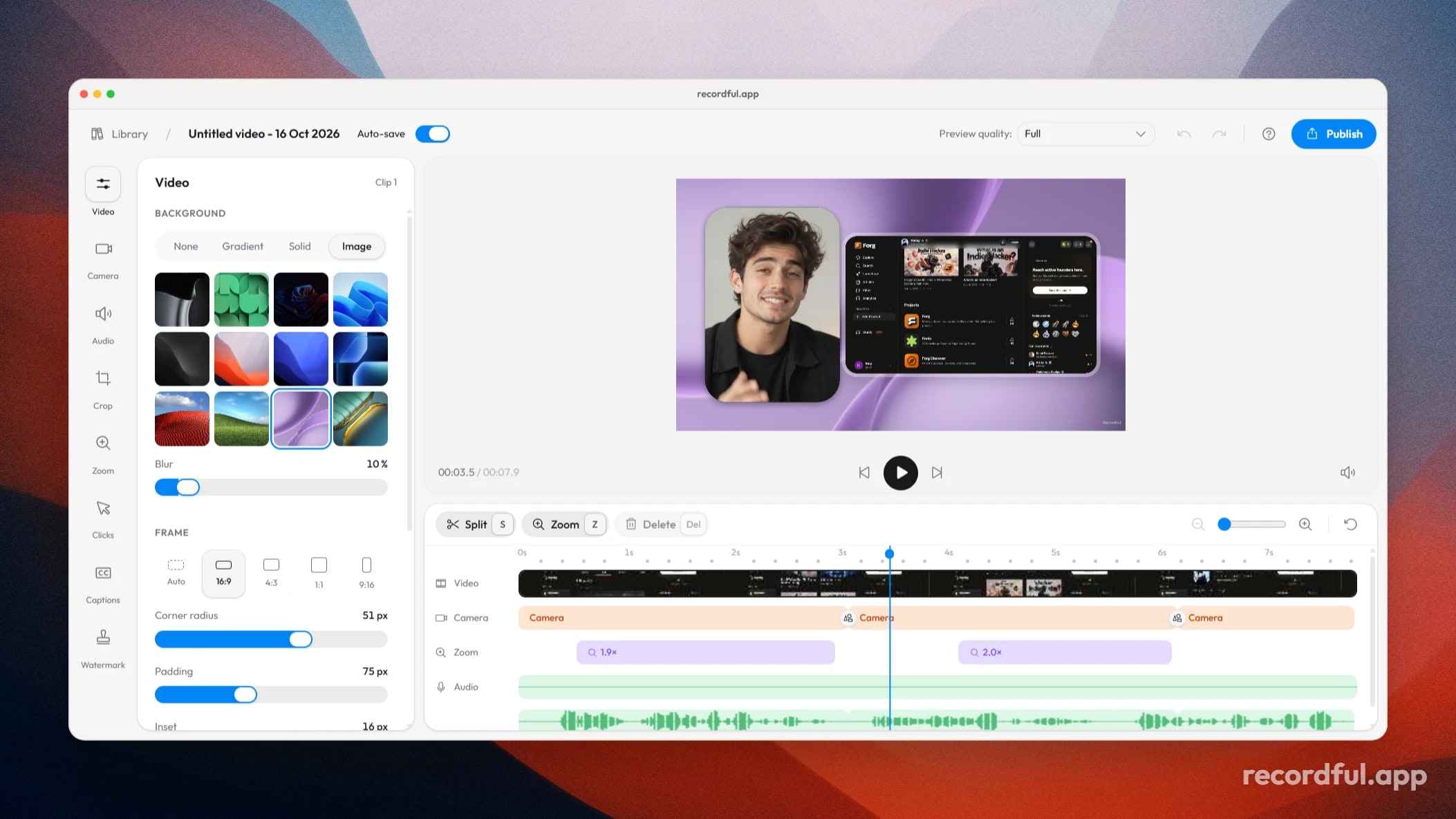
If you’ve ever wondered how creators make those beautiful screen recordings where the camera smoothly zooms into every click, you’ll want to try Recordful.
Recordful is a free screen recorder for Chrome that turns ordinary screen recordings into polished videos. It automatically zooms in around your clicks, follows your cursor, and gives you tools to customize the final recording.
You can record your browser tab, window, or entire screen, include your microphone and camera, add annotations, blur sensitive information, and edit your recording in its built-in editor.
You can also customize backgrounds, adjust your camera bubble, and export videos without watermarks or recording time limits.
It’s particularly useful for developers creating product demos, designers showing their work, and creators making tutorials.
Website: https://recordful.app
Chrome Extension: https://chromewebstore.google.com/detail/recordful-free-private-sc/hkcgjbkibidgbefehehenlmhjanjaopc
2. Raycast

Raycast is one of those Mac apps that makes you wonder how you managed without it.
Think of it as a much more powerful version of Spotlight. Instead of navigating through folders and opening different applications manually, you can access almost everything through one keyboard shortcut.
You can launch applications, search files, calculate things, manage windows, access clipboard history, create text snippets, and even use AI features.
It also has an extension store where you can connect tools like GitHub, Linear, and other services directly to your launcher.
Once you get used to Raycast, going back to the default Spotlight search feels a little limiting.
Website: https://www.raycast.com
3. Rectangle

If you regularly work with multiple windows open, Rectangle is a simple app that can make a surprisingly big difference.
macOS doesn’t offer the same level of keyboard-driven window management that some people want. Rectangle fixes that.
You can move windows to the left or right half of your screen, maximize them, position them in corners, and resize them using keyboard shortcuts.
For example, you can keep your code editor on one side and your browser on the other without manually dragging and resizing both windows.
It’s lightweight, open source, and the free version is enough for many users.
Website: https://rectangleapp.com
4. Maccy

Have you ever copied something important, copied something else, and then realized that your previous clipboard content is gone?
That’s exactly the problem Maccy solves.
Maccy is a lightweight clipboard manager that remembers the things you copy on your Mac.
Instead of losing previously copied text, links, or other supported content, you can open your clipboard history, search for an item, and paste it again.
It’s keyboard-friendly, open source, and stores clipboard history locally on your computer.
If you frequently switch between coding, writing, research, or replying to messages, this little utility can save you a lot of time.
Website: https://maccy.app
5. Obsidian

If you take a lot of notes, collect research, or like connecting different ideas, Obsidian is worth exploring.
Unlike conventional note-taking apps, Obsidian stores your notes as Markdown files on your local device.
You can link notes together, create knowledge graphs, organize information into folders, and extend the app using community plugins.
For example, you could create one note about a programming concept, link it to another note about a project, and gradually build your own interconnected knowledge base.
It’s particularly useful for developers, students, researchers, and anyone who wants to maintain a personal knowledge library.
The core app is free for personal use.
Website: https://obsidian.md
6. Keka

Here’s another useful utility that you might not realize you need until you start using it.
Keka is a file archiver for macOS that makes compressing and extracting files incredibly simple.
It supports formats like ZIP, 7Z, RAR, TAR, GZIP, and many more.
You can drag files directly onto Keka to create compressed archives, split large archives into smaller parts, and password-protect supported formats using encryption.
It’s especially useful when sharing large files, managing downloaded archives, or working with different compressed file formats.
Keka is available through its website and the Mac App Store.
Website: https://www.keka.io
Final Thoughts
These six apps solve six very different problems, but they all have one thing in common: they make everyday computer workflows a little better.
If I had to pick just three to start with, I’d recommend Recordful for screen recordings, Raycast for everyday productivity, and Obsidian for organizing your ideas.
You don’t need dozens of apps installed on your Mac. Sometimes, finding a few genuinely useful tools is enough to make a noticeable difference.
Have another Mac app that deserves to be on this list? Share it in the comments!